⚡
NpgsqlRestAutomatic PostgreSQL Web Server
Create professional, high-performance HTTP REST APIs for PostgreSQL databases in minutes and generate type-safe client code automatically.
Create professional, high-performance HTTP REST APIs for PostgreSQL databases in minutes and generate type-safe client code automatically.

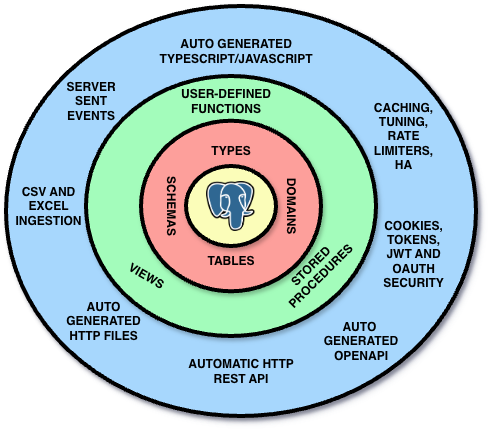
Clean PostgreSQL Architecture - PostgreSQL First Architecture - PostgreSQL Driven Architecture
Simple comment annotations turn PostgreSQL functions into fully-featured REST endpoints.
-- REST endpoint with custom path and authentication
create function api.get_user(p_id int)
returns setof user_info as $$
select id, name, email, role from users where id = p_id;
$$ language sql;

comment on function api.get_user(int) is '
HTTP GET /users/{p_id}
@authorize admin, user
@cached
@cache_expires_in 300
@rate_limiter_policy standard
';

-- Server-Sent Events for real-time updates
comment on function live_notifications() is '
HTTP
@sse
';

-- File upload with validation
comment on function upload_image(json) is '
HTTP POST
@upload for file_system
@param _meta is upload metadata
@included_mime_types = image/*
';

-- Rate-limited public API
comment on function search(text) is '
HTTP GET /search
@allow_anonymous
@rate_limiter_policy fixed
@validate _query using required
';
Why fight the database when you can embrace it?
 PostgreSQL REST API Benchmark 2026Performance comparison of NpgsqlRest vs PostgREST, Django, FastAPI, Spring Boot, and moreNpgsqlRest vs PostgREST vs Supabase: Complete Feature ComparisonSide-by-side comparison with performance benchmarks, features, authentication, file handling, and deployment optionsPerformance, Scalability, and High AvailabilityCaching strategies, retry logic, rate limiting, and multi-host PostgreSQL connections for production APIs
 Custom Types and Multiset for Nested JSON in PostgreSQL REST APIsUse PostgreSQL custom types and table types to build hierarchical REST API responses with automatic TypeScript generationPostgreSQL Optimization Labels 101VOLATILE, STABLE, IMMUTABLE, PARALLEL options, COST, ROWS, and STRICT - a quick reference for function optimizationEnd-to-End Static Type Checking: PostgreSQL to TypeScriptHow to achieve compile-time type safety from database to frontend with NpgsqlRestDatabase-Level Security: PostgreSQL AuthenticationImplementing the Principle of Least Privilege with secure cookie-based authenticationMultiple Auth Schemes, RBAC & External ProvidersBuilt-in password verification, cookies/JWT/Bearer tokens, role-based access, and Google OAuthTurn PostgreSQL into a BI Server: CSV Exports, Basic Auth & ExcelServe CSV reports directly to Excel with Basic Auth, SSL, and type composition - a complete BI system for freeSecure Image Uploads with PostgreSQL: File System, Large Objects & TypeScriptBuild a complete upload system with progress callbacks, image validation, and type-safe generated clientsCSV and Excel Ingestion Made Easy: PostgreSQL Row ProcessingTransform file imports into declarative row-by-row processing with automatic TypeScript clients and progress trackingBuild a Real-Time Chat App with PostgreSQL and Server-Sent EventsSecure real-time messaging with 25 lines of SQL - no WebSockets, no message brokers, no LISTEN/NOTIFY scaling issuesCall External APIs from PostgreSQL: HTTP Types in NpgsqlRestDefine external API calls using .http file syntax in type comments - no HTTP extensions, no middleware, just SQLReverse Proxy & AI Service: PostgreSQL Caching with Transform ModeProxy external services through PostgreSQL functions - cache AI responses, enrich data, and avoid connection pool exhaustionZero to CRUD API: Auto-Generate REST Endpoints from PostgreSQL TablesBuild a complete Contacts Manager with Create, Read, Update, Delete in under 50 lines of SQL - no backend code required


