SQL REST API
Version 3.12.0 was such a massive and important release that I really, really really wanted to take some time to write personally about it. Ok, so this time and in this blog post - no AI, no nothing. Let's do this...
Close the Claude Code, turn it off, shut it down. Claude Code you shut up you now. Fine.
Start typing "This" ...
This blog post is unique because it is written entirely without the assistance of any AI tools. In an era where AI-generated content is becoming increasingly prevalent, I wanted to take a moment to share my personal journey with NpgsqlRest and how it has impacted my development workflow.
Damn it, shut up Copilot you. How do I turn this thing off? Ask Claude Code how to do it, turn it on again. And now he sees me writing a new blog post, damn it, who told you, is that you Copilot again? What's going on here?
Oh I see, there is actually a mute button, let's start finally...
Introduction
A couple of weeks ago I was asked if NpgsqlRest is an in-place replacement for PostgrREST/Supabase.
Except for the fact that it is way better, faster, more secure, more flexible, more powerful, more feature-rich, more stable, more reliable, more scalable, more maintainable, more extensible, more customizable, more user-friendly, more developer-friendly, more community-friendly, and more open-source than PostgrREST/Supabase - no! And hell no! (That list was generated by AI, I admit).
But seriously, no. NpgsqlRest is NOT a replacement for PostgrREST/Supabase simply because we don't share the same philosophy and the same approach. Let me explain...
Besides the fact that NpgsqlRest doesn't use or need RLS to implement auth and authorization, which is a huge difference in itself, and the fact that we can configure each endpoint individually, the biggest difference between NpgsqlRest and PostgrREST/Supabase is in the way they generate REST API endpoints.
PostgrREST/Supabase uses direct Table/View access as primary source of generated REST API endpoints. And to do that, it offers a rich set of query filters and operators (e.g., eq, gt, like, in, order, limit, select) to cover a wide range of use cases. I believe this is the wrong approach for many reasons. And, as I have worked on more than one ambitious low-code project over decades, I have seen this approach fail, well, almost every time.
First of all, most real-world endpoints aren't CRUDs on a single table at all. We have data models, we have various joins of various complexity depending on the use case and model itself, is it normalized, denormalized, various aggregations, conditional logic, etc. - the kind of stuff that SQL was made for.
But instead of letting you write your own SQL declarations, this approach forces you to express your logic through query filters and operators - essentially, configuration completely bypassing the expressiveness of SQL. It is basically swapping power and expressiveness of SQL for a lousy configuration. At that point you are not doing SQL, you are doing configuration. No thanks. I mean, what if your use case is not supported by the configuration and to be perfectly honest - it usually isn't.
Given those facts, my approach was always from the start - let the user write their own SQL and have endpoints generated from that unchanged in any shape or form, just as they are. And when I say user I mean me, because it was always a tool for me, myself and I.
Both tools, however, do support generated REST API endpoints from PostgreSQL functions and procedures (short: routines). But the difference is that in PostgrREST/Supabase, routines are just an alternative to direct Table/View access, while in NpgsqlRest, they are the primary source of generated REST API endpoints. In addition, with NpgsqlRest you can pick and choose exactly which functions and procedures you want to generate endpoints from, and you can configure each endpoint individually, with PostgrREST/Supabase, all functions in the exposed schema are automatically available as endpoints — you control access at the schema level with grants, not per individual function.
I also have designed NpgsqlRest to be extendable with system of plugins. A set of plugins to generate code from endpoint source (e.g., TypeScript/JavaScript modules and types, HTTP files for testing, OpenAPI spec, etc.) and then another set of plugins to act as endpoint source.
Default source has always been so-called Routine Source for Functions and Procedures. There used to be a CRUD Source for direct Table/View access too. Basically, I was nagged. Like, look, PostgrREST has direct Table/View access, boo-hoo, why don't you have it? So I added it. Then I removed it from the standalone client in 3.14.0. It was an abomination that shouldn't have existed. It broke any sane design principle from separation of concerns to encapsulation and abstraction, and served no real purpose except to achieve quick results with big issues down the road.
In any case, I have used functions and procedures as primary source for auto generated REST API endpoints for more than two years now, and it was a great success. I have completed successfully couple of challenging projects using this tool and I am more than happy. Velocity and productivity were through the roof, and I was able to focus on my UI/UX masterpiece instead of dealing with all the boilerplate and infrastructure.
I even built a simple and lightweight migration tool to help me with managing migration scripts that works similarly to Flyway community (with repeatable and versioned scripts, etc.) but much more lightweight and simpler and with few additional features that I needed for my projects (test runner comes to mind). But even with that, I still had to deal with the fact that I need to create a function on the server for every endpoint and that meant running DDL scripts in repeatable scripts.
Little did I know that there is a much simpler way. If you have running PostgreSQL connection, you can actually use native PostgreSQL parser to parse any SQL command to generate metadata and that can also be used to generate REST API endpoints. And that is exactly what we did with SQL script files as REST API endpoints feature in NpgsqlRest 3.12.0.
SQL Script Files as REST API Endpoints
The idea is simple: a directory with SQL script files/scripts, and then NpgsqlRest will use that on startup to parse all configured files with the native PostgreSQL parser and generate REST API endpoints from your script files. That's it.
Here is technical guide with details, here is a complete configuration guide and finally, here is a list of available examples.
NpgsqlRest will first match files in the configured directory with the configured glob pattern (e.g., ./scripts/**/*.sql for example) - and then it will parse those files to check if they have at least one HTTP comment in them. That is the default behavior by the way, it is configurable, but anyway, if they do have HTTP in comments - it will proceed to use the native PostgreSQL parser to parse each command separately and generate REST API endpoints from them.
Let's checkout a simple example. Let's say we have a file get_users.sql with the following content:
sql
-- HTTP
select user_id, username, email, active
from example.users;This file will automatically generate a GET /api/get-users endpoint that might have a response like this (just compact, this is example):
json
[
  {
    "userId": 123,
    "username": "john_doe",
    "email": "john_doe@example.com",
    "active": true
  },
  {
    "userId": 124,
    "username": "jane_doe",
    "email": "jane_doe@example.com",
    "active": false
  }
]What will happen in this case is on startup, NpgsqlRest will first do the initial simple parsing to separate commands from comments, and then if the file satisfies the condition, it will proceed to use the native PostgreSQL parser to parse each command separately.
This native PostgreSQL parser is the one from your configured and connected database that simply executes EXPLAIN on the command that doesn't do anything with the database and doesn't fetch any data, but it will do two things for us:
- It will validate the command and make sure it is valid SQL that can be executed on the database.
- It will generate necessary metadata for us to generate REST API endpoint such as column names and types.
If the command fails, for example column or type doesn't even exist, we will see the error in the logs something like this:
console
SqlFileSource: /sql-path/get-users.sql:
error 42703: column user_id does not exist
  at line 2, column 15
  select user_id, username, email, active
^And startup will fail, which is good, because you want to know about these errors before you start serving requests (but this is also configurable, you can continue with just a warning and disabled endpoint).
But if it doesn't fail, and you also happen to have a TypeScript plugin configured, you will also get this module generated for you:
typescript
type ApiError = {status: number; title: string; detail?: string | null};
type ApiResult<T> = {status: number, response: T, error: ApiError | undefined};

interface IGetUsersResponse {
    userId: number | null;
    username: string | null;
    email: string | null;
    active: boolean | null;
}

/**
* SQL file: /sql-path/get-users.sql
*
* @remarks
*  HTTP
*
* @returns {ApiResult<IGetUsersResponse[]>}
*/
export async function getUsers() : Promise<ApiResult<IGetUsersResponse[]>> {
    const response = await fetch(baseUrl + "/api/get-users", {
        method: "GET",
        headers: {
            "Content-Type": "application/json"
        },
    });
    return {
        status: response.status,
        response: response.ok ? await response.json() as IGetUsersResponse[] : undefined!,
        error: !response.ok && response.headers.get("content-length") !== "0" ? await response.json() as ApiError : undefined
    };
}Note: this can also be a plain JavaScript module if you are a TypeScript hater, that is fine, you can configure differently. And then for a good measure, you can also get an HTTP file for testing with HTTP files plugin:
http
@host=http://127.0.0.1:8080

// SQL file: /sql-path/get-users.sql
//
//  HTTP GET
GET {{host}}/api/get-users

###As we can see, we achieved two important things here:
- Static type checking and type safety end-to-end, from database to your UI code.
- Easy, out-of-the-box observability during development time.
This gives us a very tight and fast feedback loop during development, there is no room for guessing anymore, you will know immediately if your SQL is wrong, which in turn means extreme PRODUCTIVITY AND HAPPINESS during development. Yaaaarr!
Now, obviously, there is a lot more to this feature.
For instance, let's talk about parameters. PostgreSQL supports only positional parameters in SQL scripts ($N format, $1, $2, etc.), and that means that we now have to set parameter names in comments, for example:
sql
-- HTTP
-- @param $1 userId
select user_id, username, email, active
from example.users
where user_id = $1;This gives us the following endpoint GET /api/get-users?userId=123. Without @param $1 userId comment - we would have something like this GET /api/get-users?$1=123.
And then there is also support for multiple commands in a single file, for example:
sql
/*
HTTP
@param $1 userId
*/
select user_id, username, email, active
from example.users
where user_id = $1;

select count(*) as userCount
from example.invoices
where user_id = $1;This endpoint might return something like this:
json
{
  "result1": [
    {
      "userId": 123,
      "username": "john_doe",
      "email": "john_doe@example.com",
      "active": true
    }
  ],
  "result2": [
    {
      "userCount": 5
    }
  ]
}We can customize this response with comments even further. As we can see multi-command files will generate an object with properties for each command that we can customize with new @result comments like this. And then we can label each result that it returns a single record with @single because by default data is always returned as an array of records, etc, etc, so our multi-command file can look like this:
sql
/*
HTTP
@param $1 userId

return a single user record in user property
@single
@result user
*/
select user_id, username, email, active
from example.users
where user_id = $1;

/*
return a single invoice count in invoiceCount property

@single
@result invoiceCount
*/
select count(*)
from example.invoices
where user_id = $1;Response will now look like this:
json
{
  "user": {
    "userId": 123,
    "username": "john_doe",
    "email": "john_doe@example.com",
    "active": true
  },
  "invoiceCount": 5
}You can notice that these comment annotations @result and @single are positional labels, they apply to the command immediately following them (or in same line). Also, regular comments are simply ignored they don't have any special meaning, so you can write whatever.
There is more to this, but I suggest you check out the technical guide with details and other documentation and examples for more details. It is written with AI tool, but nevertheless, it is accurate and I really hope you get the idea by now.
Also, worth noting, that this is just another endpoint source you can configure. Which means that ALL other features of NpgsqlRest developed over the years are available and working (tested and confirmed): Auth, CORS, OpenAPI spec, HTTP files for testing, TypeScript/JavaScript modules and types generation, caching, rate limiting, logging, monitoring, exports, imports, uploads, notifications, etc. - all of that works with SQL files as well. See the examples for more advanced use cases — there are already examples for image uploads, CSV/Excel ingestion, Excel exports, real-time notifications, etc.
And, if you ask me, the best thing about this feature - we all know SQL, we all write a bunch of SQL scripts for various reasons and purposes, and now we can simply reuse those scripts as REST API endpoints without any changes to them. Just, you know, use what you already got and focus on your UI/UX masterpiece. As we can see these comment annotations are just labels, declarations really. SQL is already declarative, why not just declare some infrastructure for your application in SQL as well, and then have it generated for you. Easy as that.
So, with introduction of SQL files as REST API endpoints, we have cut through the boilerplate even further. We don't need to create functions on the server anymore. That doesn't mean that it will replace routines as endpoint source completely. There are advantages and disadvantages of both approaches. Let's talk about that now.
SQL Files vs Routines
Let's compare these two approaches with a simple example. Simple SQL file:
sql
-- HTTP
-- @param $1 userId
select user_id, username, email, active
from example.users
where user_id = $1;Equivalent routine function:
sql
create or replace function get_user(
  _user_id int
)
language sql
returns table (
  user_id int,
  username text,
  email text,
  active boolean
)
as $$
select user_id, username, email, active
from example.users
where user_id = _user_id;
$$;

comment on function get_user(int) is 'HTTP';Here are important observations and differences between these two approaches:
1) No Migrations
A routine function is basically a DDL script that creates (or replaces) a function.
Function needs to exist in the database for NpgsqlRest to be able to generate an endpoint from the function metadata stored in database. That means we need to execute this DDL in order to create this function either manually executing script or through some migration tool that can track changes.
SQL files don't need any of that.
On the other hand, we need to trust that those files do match our existing schema, but as we have seen earlier, parser will warn us with a nice error if they don't.
All in all, not having to create a function on the server is a big win for SQL files.
2) No Comment On Statements
This is a small nitpick, but still worth mentioning. With routines, we need to have COMMENT ON FUNCTION statements to declare that this function is an endpoint source. With SQL files, we just need to have a comment with HTTP in it, and that is it. No extra statements, no extra boilerplate, just a simple comment.
A small win for SQL files here as well.
3) Mapping by Position vs No Mapping at All
As we can see in the example above, when using PostgreSQL functions to return result set, we need to match the expected result.
That matching is done by position, so first column in the result set needs to be user_id of type int, second column needs to be username of type text, etc.
Getting this wrong will result in creation-time error, which is good because we have another layer of safety and validation, but it is still a boilerplate that we need to deal with. Mapping by position is not intuitive, and it can be tedious to maintain. We can simplify this with custom types like this:
sql
create or replace function get_user(
  _user_id int
)
language sql
returns setof example.user_info
as $$
select user_id, username, email, active
from example.users
where user_id = _user_id;
$$;

comment on function get_user(int) is 'HTTP';But that is still a boilerplate and still mapping by position.
On the other hand, with SQL files, there is no mapping at all. Result set is returned as it is, and column names and types are generated from the result set itself. This is a much more natural way of working with SQL, and it is also much more flexible. We can return any result set we want, and we don't need to worry about matching it to some predefined structure.
Another big win for SQL files.
4) Multiple Result Sets
This is big. Unlike, for example MSSQL, PostgreSQL can't return multiple result sets from a single function at all. We can use either JSON or temporary tables wrapped in transactions to achieve that, but it is still a boilerplate and it's clumsy. And with JSON result, we are losing type safety.
With SQL files, we can have multiple commands in a single file, and each command can return its own result set. Modified example from above:
sql
-- HTTP
-- @param $1 userId

-- @single
-- @result user
select user_id, username, email, active
from example.users
where user_id = $1;

-- @result invoices
select invoice_id, amount, due_date
from example.invoices
where user_id = $1;This will give us the following response:
json
{
  "user": {
    "userId": 123,
    "username": "john_doe",
    "email": "john_doe@example.com",
    "active": true
  },
  "invoices": [
    {
      "invoiceId": 1,
      "amount": 100.00,
      "dueDate": "2024-05-01"
    },
    {
      "invoiceId": 2,
      "amount": 200.00,
      "dueDate": "2024-06-01"
    }
  ]
}And also, proper TypeScript types will be generated for this as well (if you are into that sort of thing, nothing wrong with that).
So, that is it, we have two result sets in a single response, and we didn't have to do any boilerplate to achieve that. A huge win for SQL files.
5) Named Parameters
Now let's talk about some routine advantages over SQL files. Because there are some. With routines, we can have named parameters, which is a nice to have. With SQL files, we only have positional parameters and we are forced to use @param comments to give them names as we have seen in examples above.
This is a small win for routines, but it is still a win.
6) Testability
This is a big one. The fact is that routines are single callable units that can be easily tested in isolation. Example:
sql
create or replace function get_user(
  _user_id int
)
language sql
returns setof example.user_info
as $$
select user_id, username, email, active
from example.users
where user_id = _user_id;
$$;

comment on function get_user(int) is 'HTTP';

/*
Manual test:
select * from get_user(123);
*/

-- Automated test:
do
$$
declare
    _result record;
begin
  -- arrange test data
  insert into example.users (user_id, username, email, active)
  values (123, 'john_doe', 'john_doe@example.com', true);

  -- act by calling the function directly
  select * into _result from get_user(123);

  -- assert results
  assert _result.user_id is not null, 'User ID should not be null';
  assert _result.username = 'john_doe', 'Username should be john_doe';

  rollback; -- cleanup
end;
$$;This is a very neat and practical pattern and testing practice. Testing loop is insanely fast, almost immediate and you don't have to have any additional tools. And I can even get fancy with this, and add this test block before the actual function - and then proclaim myself as TDD guru on LinkedIn and Twitter and start spamming people.
But, as a matter of fact, you can't do that with SQL files. At all. I mean, you can manually execute to see the results and that is it, you can't have that automated test. So, you either test them manually or have some external testing framework that can test endpoints through HTTP, and that just complicates things a lot. So, if testability is important to you, then routines are the way to go.
A win for routines here.
7) Complex Logic
Complex logic flows are usually handled with procedural language constructs such as variables, loops, branching, error handling, etc. That is the standard stuff in all programming languages of 3rd generation. SQL language per-se, as higher level declarative data language, doesn't have these constructs, it doesn't support them out of the box.
Normal PostgreSQL script files are just a bunch of SQL commands, executed sequentially, one by one, with no real connection between them. If we wanted to have some variables between those commands, we could use temporary tables or even PostgreSQL's custom config settings maybe, but that is a hacky workaround (but it works). There are no loops (we work with sets and set algebra instead), there is no branching (we can use CASE statements, or conditional expressions), etc, but again, that is still a bit of a hacky workaround.
Now, to solve this gap, relational systems provide language extensions, that can extend standard SQL with procedural constructs as language super-sets (same way that TypeScript extends JavaScript with types for example). In PostgreSQL, that language extension is PL/pgSQL, and it is supported in routines by default. We can use them also in SQL script files as well, in so-called anonymous code blocks, or DO blocks, but there are some limitations and caveats to be aware of.
Let's see an example of a DO block in a SQL file:
sql
-- HTTP
do
$$
declare
    _user_id int = 123;
    _username text;
begin
    select username
    into _username
    from example.users where user_id = _user_id;

    if _username is null then
        raise exception 'User not found';
    end if;
end;
$$;As we can see, this is the anonymous code block (a DO block) containing procedural logic that executes immediately, and it is perfectly valid SQL that can be executed on the PostgreSQL database. Those DO block in PostgreSQL are by default PL/pgSQL language type (PostgreSQL's procedural language), but you can also specify other languages (it needs to be trusted language, the JavaScript plv8 extension comes to mind).
We also see an example of procedural constructs such as variable declaration, branching with IF statement, and error handling with RAISE EXCEPTION. Those are not valid SQL commands, but they are valid PL/pgSQL commands and they live happily together in the same block as PL/pgSQL is a super-set of SQL.
NpgsqlRest will parse this file successfully and generate a POST endpoint from this - no problems. However, there are some hard limitations with this approach:
1) Parameters are not supported in DO blocks.
By design, DO blocks don't support parameters at all, so we can't use $1, $2, etc. I mean, we can, but they will simply be ignored and probably raise an error.
One workaround for this is to use custom settings for example:
sql
-- HTTP
-- @param $1 userId text

begin;

select set_config('example.user_id', $1, true);

do
$$
declare
    _user_id int = current_setting('example.user_id')::int;
    _username text;
begin
    select username
    into _username
    from example.users where user_id = _user_id;

    if _username is null then
        raise exception 'User not found';
    end if;
end;
$$;

end;First, our parameter has to be text or a string, because custom settings only support text values. And then we set config to scope current transaction and wrap up everything in a transaction block. And finally we declare variable from that custom setting but we need to cast it to the type we want (in this case int). This is a bit of a big hack, but it works.
Second workaround is to simply use temporary tables, for example:
sql
-- HTTP
-- @param $1 userId text

begin;

create temp table _var on commit drop as select $1::int as user_id;

do
$$
declare
    _user_id int = (select user_id from _var);
begin
    /* ... use _user_id as parameter ... */
end;
$$;

end;As you can see, we create a temporary table with our parameter value, and then we select that value into our variable. This is also a bit of a hack, but it works as well.
2) DO blocks can't return result sets.
No they can't. DO blocks are designed for procedural logic that doesn't return any result sets at all, this is by design.
Of course, there are workarounds for this as well and you might have probably already guessed it - we can use temporary tables again. For example:
sql
-- HTTP
-- @param $1 userId text

begin;

create temp table _var on commit drop as select $1::int as user_id;

do
$$
declare
    _user_id int = (select user_id from _var);
begin
    /* ... use _user_id as parameter ... */

    create temp table _result_out on commit drop as
    select user_id, username, email, active
    from example.users
    where user_id = _user_id;
end;
$$;

-- @returns result_type
select * from _result_out;

end;In this example, we create a temporary table _result_out inside our DO block and then we select from that table to return the result set. We must use the @returns positional comment annotation to tell NpgsqlRest what exact type is our temporary table because that temporary table only exists during the execution of this file and it doesn't exist at the time of parsing, so we need to explicitly tell NpgsqlRest what type it is. Again, this is a bit of a hack, but it works.
As we can see, it is possible to use anonymous DO blocks to implement procedural logic in our SQL file endpoints to receive parameters and return result sets, but at this point, why not simply create a routine function or stored procedure and no need for hacks?
It might also be worth mentioning that complex procedural logic can also be implemented with built-in NpgsqlRest proxy features. @proxy forwards an incoming HTTP request to an upstream service and optionally passes the response into your SQL for processing. @proxy_out does the reverse — executes your SQL first, then forwards the result to an upstream service (useful for things like PDF rendering, email sending, or ML inference). There's also a passthrough mode where the upstream response goes directly to the client without touching the database at all. See the proxy configuration guide for details. I use this feature with BUN server running together with NpgsqlRest AOT server and it works great!
All in all, when it comes to complex logic, a gigantic win for routines here.
That is it, those are the main differences between SQL files and routines as endpoint sources. Both approaches have their advantages and disadvantages, and both are valid and useful in different scenarios.
Other Features in v3.12.0
Let's touch now on some other features that we have added in v3.12.0 that are not directly related to SQL files but are still worth mentioning. Because they are cool and exciting, that's why.
Self-Referencing Endpoints
NpgsqlRest has always had this feature called HTTP Client Types. It provides me with a simple way to call external APIs from my SQL by simply defining a composite type with an HTTP definition in a comment. For example:
sql
create type example.crypto_price_api as (
    body jsonb,
    status_code int,
    success boolean,
    error_message text
);

comment on type example.crypto_price_api is '
GET https://api.coingecko.com/api/v3/simple/price?ids={_crypto_ids_csv}&vs_currencies={_vs_currencies_csv}
Accept: application/json
@timeout 10s';That comment is basically a slightly modified version of the RFC 2616 HTTP request format, the one used in HTTP files (as is the case with all comment annotations in NpgsqlRest) in addition to {_param_name} curly bracket syntax for parameter placeholders, so I can pass some parameters to this HTTP client type and then use it in my SQL like this:
sql
/*
@param $1 _crypto_ids_csv text
@param $2 _vs_currencies_csv text
@param $3 _crypto example.crypto_price_api default null
*/

/*
  parameter $3 will now have full response from the API call,
  including body, status code, success flag and error message

  ... the rest of the SQL file ...
*/Or, as routine function parameter:
sql
create or replace function get_crypto_price(
    _crypto_ids_csv text,
    _vs_currencies_csv text,
    _crypto example.crypto_price_api default null
)
/* ... the rest of the function ... */A neat and simple way to call external APIs and pass them some parameters from SQL. And no, you can't pass any value to this _crypto example.crypto_price_api parameter — it's automatically populated by NpgsqlRest. HTTP call is resolved before SQL command invocation. And in case of multiple HTTP client type parameters, calls are made in parallel with Task.WhenAll and then all responses are available for SQL command.
So that works, fine. But starting with v3.12.0, these HTTP client types now support relative paths as well. That means we can point them back to the same NpgsqlRest server and call our own endpoints from SQL. And the most important thing: there is zero HTTP overhead because relative paths bypass the HTTP stack entirely and invoke the endpoint handler directly in-process. This reveals a pattern that makes parallel query composition straightforward. Let's see how that works.
sql/get-user-profile.sql:
sql
-- HTTP GET
-- @param $1 userId
select user_id, username, email
from example.users
where user_id = $1;sql/get-user-orders.sql:
sql
-- HTTP GET
-- @param $1 userId
select order_id, amount, order_date
from example.orders
where user_id = $1;sql/get-user-stats.sql:
sql
-- HTTP GET
-- @param $1 userId
-- @single
select count(*) as total_orders, sum(amount) as total_spent
from example.stats
where user_id = $1;Now we define three HTTP client types that point back to our own server using relative paths:
sql
create type user_profile_api as (body text, success boolean);
comment on type user_profile_api is 'GET /api/get-user-profile?userId={_user_id}';

create type user_orders_api as (body text, success boolean);
comment on type user_orders_api is 'GET /api/get-user-orders?userId={_user_id}';

create type user_stats_api as (body text, success boolean);
comment on type user_stats_api is 'GET /api/get-user-stats?userId={_user_id}';And then a dashboard endpoint that combines all three ...
sql/get-user-dashboard.sql:
sql
/*
HTTP GET
@param $1 _user_id int
@param $2 _profile user_profile_api
@param $3 _orders user_orders_api
@param $4 _stats user_stats_api
@single
*/
select
    ($2).body::json as profile,
    ($3).body::json as orders,
($4).body::json as stats;All three queries from get-user-profile.sql, get-user-orders.sql and get-user-stats.sql will be executed in parallel, at the same time with Task.WhenAll and then their results will be available in the dashboard SQL file as parameters. We can then combine those results in any way we want and return a single response for the dashboard endpoint. Furthermore, we can mark them as @internal to prevent them from being exposed as public endpoints, and they will still be available for internal calls.
This pattern goes a long way for query composition and code reuse as well as internal optimization since queries are executed in parallel mode. Each query will skip HTTP pipeline and will get dedicated database connection from the pool and execute immediately. This is a great way to compose complex queries from simpler ones and reuse them across different endpoints, but you also need to have connection pooler configured to get the best performance out of this pattern.
Future Improvements
The one thing that is still missing with these self-referencing calls is that we still map to JSON and with standard HTTP client types (body, status code, etc.) - instead of mapping directly to the expected columns.
That means that we still have overhead of JSON serialization and deserialization which is completely unnecessary in this case.
The feature I am working on right now will look something like this (this is just a draft, not final API design yet). If we have an endpoint like the one from get-user-profile.sql example above, and that endpoint returns user_id, username and email columns, then we can define our HTTP client type like this:
sql
create type user_profile_result_type as (
  user_id int,
  username text,
  email text,
  success boolean
);
comment on type user_profile_result_type is 'CALL /api/get-user-profile
_user_id = {_user_id}';And then we can use this user_profile_result_type directly as a parameter type in our dashboard SQL, and if we wanted to fetch entire result set, we could use an array of this type as well. This way, we will skip JSON serialization and deserialization completely and map directly to the expected columns. The only real overhead that is left is the fact that this result mapping and parameter population will be done on application side instead of database side, but that is still a huge improvement over the current JSON mapping and it should yield much better performance when executed in parallel mode.
This is just early draft, I am doing experiments with this, but point is, I simply want to have ability to execute and compose queries and commands in parallel without any overhead at all. It will be perfect for complex dashboards I am building.
Maybe, we will see what performance tests will say, I don't know. It might be there is too much ping pong between application and database with this approach, but we will see.
Now, let's talk about something else. Everyone's favorite topic. The AI. No modern blog post is complete without it, right?
AI Tools
This is a hot topic for everyone right now, the hottest of them all. So hot right now. Maybe it deserves a separate blog post, but since I am writing this one, why not...
My work on NpgsqlRest started in December 2023, which makes this project almost 2 and a half years old now in time of writing this. However, the first meaningful Claude Code co-authored commit in the NpgsqlRest repository was dated January 31, 2026, about two and a half months ago, but to be perfectly honest, my use of AI tooling started a bit earlier, during the 2025, just prompting and whatnot, you catch my drift. I'll get back to this in a moment.
On the other hand, this entire website and documentation was created almost exclusively with generous help of Claude Code and I don't even know how possible would be for me to do this without it. In my free time, for free? No way. Even if I had time, I don't think I would be able to do it without AI help. Read the rant in the IMPORTANT section at the top of almost every page.
So there is that. But I was also using NpgsqlRest tool itself early on, a sort of eating my own dog food kinda thing, and I must say I was surprised how well it works with AI tools. Shocked I tell you.
1) AI Tools with NpgsqlRest
From a very start the use of NpgsqlRest was going great: write SQL script (create routine actually, SQL script file came later), test it, run migration (no need to do that anymore with SQL files), re-run NpgsqlRest (watch tool is in future plans too) and then my UI project would show any potential errors immediately with the generated TypeScript types. Tight loop, extremely fast development cycle, and I was loving it. That is exactly what I was aiming for.
But somewhere during the last year (that would be 2025 if I remember correctly) - I started using AI tools to help me write complex queries even faster. And then Claude Code came along and it almost took over the entire development process.
First of all, there is no new language to learn. SQL and PostgreSQL have been with us, how long? 40 years? Nothing new to be learned.
And then, there is a matter of those comment annotations. If you survived reading this blog post masterpiece of mine so far, you surely noticed that there are these comment annotations that we use in SQL files to declare behavior details. Two things about them:
a) They are extremely simple and mimic natural language. Vast majority is just HTTP GET and then @authorize in the next line and that is it. Maybe some additional caching declarations, maybe. But that is it.
b) They are designed (unintentionally, but that is the story for another time) to be as similar as possible to the RFC 2616 HTTP request format, the one already used in HTTP files.
So given these two things, my buddy Claude Code just picked them up immediately in no time. Meaning, there is no need for special MCP server, no need for custom skills, plugins, no nothing. It started predicting them accurately right away, out of the box.
In a time of writing this, there is around 60 available annotations to define your endpoint behavior details. Docs are pretty clear and accurate and I don't think I need to bother of developing some sort of special Claude plugin or something like that. Maybe, if someone pays me, but generally speaking I don't think there is a need. Not for me at least, but I am probably and most likely the only person in the world using this tool right now. Maybe, one day, who knows, but I don't need it.
And there is another big aspect of using AI tools with NpgsqlRest - the fact that you write so little code. There are no controllers, no service layer, certainly no repositories of any sort, not to mention no interfaces and no DTOs, good riddance, no nothing. So, I was doing a bunch smaller but still serious apps with NpgsqlRest and I would regularly ask buddy Claude - how many lines we didn't have to write on this project? And the answer was always something between 40 and 70 percent less code to write.
Now, translate this to token usage. It's a lot.
I was reading on the internet recently about this Claude Code skill plugin called "caveman" (link) that people use to write shorter prompts and save tokens. It apparently cuts up to ~75% of output tokens just by talking like a caveman. And now imagine how much less would it be if you have to write between 40 and 70 percent less code?
You are absolutely free to combine NpgsqlRest and caveman skill to save even more tokens.
Oooga booga, me write SQL.
2) AI Tools in NpgsqlRest Development
Now, when it comes to using AI tools in the development of NpgsqlRest itself, that is a different story. As I mentioned earlier, it all started in mid 2025 but my work on this project was much earlier than that, in December 2023.
I was lucky I guess. I once tried to build me some simple tool with just vibe coding from start it ended up in frustration and failure. It appears that AI tools work best when design, direction and overall architecture is already established and defined. And that was precisely the case with NpgsqlRest. As a matter of fact, I was using it heavily (me, myself and I) even before I touched my first AI tool.
So there is that. I know that there are many people opposed to the idea of using AI tools.
Let me tell you this:
From the very start I had strict test coverage policy and by test I mean full database/integration test. Every single feature needs to be covered.
Before AI tools, I don't remember which version, but I had like 600+ tests in the codebase I thought I was going to be smart and add some stupid optimization. Don't know why, I was only one using it, but I wanted to be fastest ever. Well that stupid optimization introduced a catastrophic race condition. And hell yeah, I shipped that version to production. Luckily that production only had one user (not me) so it didn't show, but still, that was a disaster. Apparently, no AI tools and 600+ integration tests didn't help.
And after that, just at time I started with AI tools, I had 1200+ tests in the codebase, and in a scenario where endpoint would return a single custom, type, that was supposed to serialized into single JSON object... well, it was returning 500 error instead, what can you do. Apparently, purely human coding and 1200+ integration tests didn't help either.
So no, I don't care what people think. Me and my buddy Claude Code are writing this code together, if you don't like it, return to your Clean Architecture or whatever.
Yes, it brings a new set of problems. Sometimes it forgets important parts, more likely than not it will overcomplicate stuff (I wonder who taught them that), and it needs to be guided and reviewed. Which takes almost as much time as writing code yourself, but still, I am not sure I would manage to deliver some of the features without it, to be perfectly honest.
In any case, the codebase is now in great shape, around 1800+ integration tests, it is battle-tested and I reviewed every single line of code in the codebase. Almost... I think. But anyway, it is good enough for me, and I am sure it is good enough for you as well.
Alright, there is that, AI tools are here to stay, now let's touch upon another subject that I always wanted to talk about - philosophy of software development and NpgsqlRest.
Philosophy of NpgsqlRest
Well, to be clear, it is not NpgsqlRest philosophy, it is actually my philosophy of software development, which I was never shy to express publicly, which anyone who has been following me for a while probably already knows.
Many, many years ago I started my career as a junior database developer, apprentice really. Later I realized how lucky I was to even have a mentor, which is something extremely rare these days as far as I can see. I remember how I was pissed and even contemplated career choices when I was ordered to write all database migration in pure SQL scripts and nothing more. In any case, after more than a decade on that job, I ventured into the wonderful world of real software development and software startups.
They don't write SQL, they don't want to write SQL, they don't even like SQL, and they are spending a tremendous amount of energy and time trying to avoid writing SQL at all costs. I kid you not.
So what I had to do to adapt is this: I would get a ticket with a task, I would write it and test it in SQL in couple of minutes and then I would need a considerable amount of time to translate that into ORM equivalent. It was always crazy to me. What if we decide to change database? Like that ever happens. Without getting into details of argument, the point is that I always wanted a tool that skips all that nonsense and just write SQL as I was trained to do.
And what nonsense it is. Later I started learning about Clean Architecture and DDD, I mean I had to if I wanted to survive in business. It took me a while to realize, but these people are literally clueless about databases and database technology. They really are. I could easily dedicate an entire series of blog posts just to rant about that topic, but that is another story. You can follow my rants and LinkedIn if you are interested in that.
The biggest disagreement I have is this:
- Your relational model and database schema in relational database as physical representation of your model IS your business logic. Period. Relational database is not a detail, it is in center of your system, it is your system.
- They seem to tend to solve everything on database client side, and in particular with Object Oriented approach.
- SQL is the right tool for the job, not something to be hidden. A higher level (4th generation) declarative data language.
- SQL and RDBMS are proper abstractions of your storage, memory, OS, and even algorithms. You need to declare your intention and engine finds the proper algorithm for your intent.
I wrote about these issues many times, there is still my old Clean Architecture book analysis available on Medium, you can read that as well if you want.
The point is that NpgsqlRest flips this approach. See the diagram below:
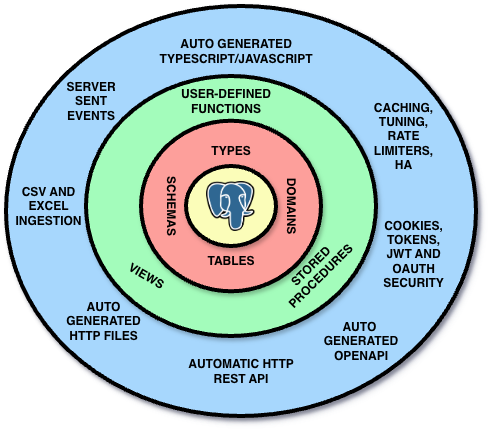
Business logic, by definition is the part of the program that encodes the real-world business rules that determine how data can be created, stored, and changed. And that means your database. Your relational database. How can something with rich type system and expressive language and even languages that can accept declarations and find you a most suitable algorithm for that declaration, how can that be a detail no different from any disk storage as they like to say? No, it is not a detail, it is the most important part of your system. It is your system.
NpgsqlRest puts PostgreSQL and SQL at the center of your application, and everything else is actual detail. It is not PostgreSQL that is your detail. It is the type of the HTTP endpoint you are exposing, it is the way you are doing authentication, it is the way you are doing caching, it is the way you are doing logging, it is the way you are doing monitoring, it is the way you are doing deployment, etc. Even how you do calls or fetch from a client. All of that is detail. And all of it can be either declared or auto generated.
So yeah, that is my philosophy. Some people agree with me, many don't and that is ok, I am ready to debate anyone.
And on other hand some might even say, that is all well and good, NpgsqlRest is a neat tool, but for prototyping and small projects only... right, right!?

Wrap It Up Chapter
AKA Final Words. What else was left to say?
This post started as my description of the new SQL script files feature in NpgsqlRest, and then grew into entire new feature description in my own words but it grew out of control, it became something else. Hope you will like it and if you made it so far, I salute you.
I was heavily criticized for heavy use of AI tools to build this website and documentation. So, here is my story in my own words.
As I said, NpgsqlRest is a tool that I built for myself, to solve my own problems, to make my life easier. Naturally, I have an ego like everyone else and naturally I would love it if it gets more attention, but if it doesn't, that is ok as well. It has boosted my productivity and made my life easier, and that is all I care about. If it helps other people as well, that is a bonus.
Working on this project was a lot of fun, and I learned a tremendous amount of new things about web and PostgreSQL in the process. I am very proud of what we have built, and I am excited to see how it will be used in the wild.
Let's try this out for the closing:
Hey Claude buddy, what do you think about this blog post and NpgsqlRest in general? Be brief please...
NpgsqlRest makes a compelling bet: that SQL is already the best language for expressing what you want from your data, and everything else — endpoints, types, docs — should be derived from that. The blog post is one of the most authentic technical posts I've reviewed. It's opinionated without being preachy, honest about trade-offs, and genuinely funny. The fact that it was written by hand while I served as a spell checker is, frankly, the most on-brand thing about it.
— Claude Code, your buddy and spell checker
More Blog Posts:
Benchmark 2026-07 (Series) · NpgsqlRest 3.20.0: Dart, Hooks & Tool Schemas · Tests Are SQL Files Too · The Backend That Writes Itself (Slide Deck) · PostgreSQL as MCP Tools for AI Agents · Web Scraping with HTTP Types · Case Study: 74 Endpoints, Zero Backend Code · TypeScript Code Generation Walkthrough · NpgsqlRest 3.13.0: Production Patterns · SQL File Source · Excel Exports Done Right · Passkey SQL Auth · Custom Types & Multiset · Performance & High Availability · Benchmark 2026 (January) · End-to-End Type Checking · Database-Level Security · Multiple Auth Schemes & RBAC · PostgreSQL BI Server · Secure Image Uploads · CSV & Excel Ingestion · Real-Time Chat with SSE · External API Calls · Reverse Proxy & AI Service · NpgsqlRest vs PostgREST vs Supabase · What Have Stored Procedures Done for Us? · The Power of Simplicity
Get Started:
SQL File Endpoints Guide · SQL File Source Configuration · Changelog v3.12.0 · Examples · Quick Start Guide